


Lingopie: Language Learning
4.4689.00 Reviews
App Specs
- Version
- 9.8.56
- Updated On
- License
- Free
- Downloads
- 500,000+
- Developer
- Lingopie
- Categories
- Education
- Platform
- Android
Screenshots
 Analysis by AppCompare
I’m usually skeptical of language-learning apps that promise fluency through entertainment alone. Watching a show can be enjoyable, but enjoyment does not automatically turn into useful listening skills or confident speaking. Lingopie takes a more practical approach by putting language learning around video and songs, then making the viewing experience do more work than ordinary subtitles. After spending time with it, I see it as a particularly good fit for learners who are tired of isolated vocabulary drills and want regular contact with natural speech.
That does not make it a complete replacement for a structured course, a tutor, or deliberate speaking practice. Its strongest contribution is exposure: hearing a language in context, noticing how expressions are used, and building the habit of engaging with material that feels closer to real life than a sequence of textbook dialogues. The app is free to install, carries a Everyone 10+ age rating, and includes optional purchases ranging from one dollar to just under eighty-four dollars per item. That makes it easy to try, although the long-term value depends on how much of the experience is available without paying and whether its video-centered method suits your learning style.
How Lingopie feels as a language-learning app today
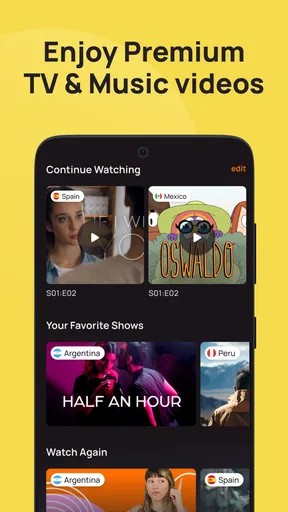
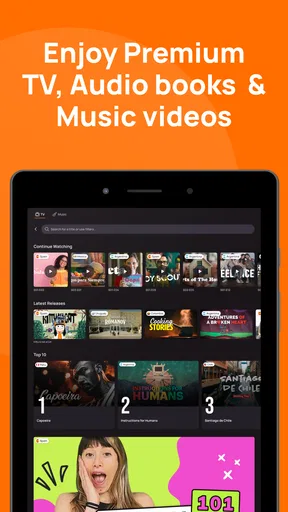
Lingopie is an education app from Lingopie, rather than a general streaming service with a language option added afterward. That distinction matters. The point is not simply to press play and hope that your brain absorbs another language. The useful idea is that videos and songs give you a reason to stay engaged while you encounter vocabulary, rhythm, pronunciation, and conversational shortcuts in context.
In my experience, this makes the app feel less demanding at the beginning of a study session. Opening a traditional lesson often creates a small mental barrier: I need to concentrate, complete exercises, and remember that I am studying. With a video-based app, I can begin with something that resembles leisure. The challenge is then to remain active rather than watching passively. Lingopie works best when I pause, replay, compare subtitles, and write down expressions that I could actually use.
The current release is version 9.8.56, and the app has been available since February 22, 2021. Its presence on the market is reflected in an average rating of 4.4 from around 6.6 thousand ratings, with more than 500 thousand installs. Those figures do not tell me whether every learner will enjoy the method, but they do suggest that the concept has found a substantial audience beyond a short-lived experiment.
The interface is most useful when I treat it as a listening environment rather than a conventional course. A learner who wants a clear daily sequence, visible progress through grammar units, and frequent tests may find the experience less reassuring than a lesson-first platform. Someone who already understands basic sentence structure, however, can use the videos to bridge the uncomfortable gap between classroom language and the way people actually speak.
Why video changes the learning task
Textbook examples are deliberately clean. Real dialogue is not. Speakers shorten words, change their tone, interrupt one another, and rely on context. Video lets me connect a phrase with a situation, facial expression, and emotional intention. That is valuable because translation alone often hides the difference between a polite request, an impatient suggestion, and a joking comment.
Worth Reading Before You Choose

EA SPORTS FC Mobile 26 Is a Bigger Football Game, but It Takes Time

Flipboard Shows What News Apps Must Do Beyond the Feed

Switching to Android Auto Means Rethinking Your Driving Routine

Google Calendar Makes a Crowded Week Easier to Manage

Ludo King Makes the Most of the Minutes Between Plans

Baby Panda World Brings Quick Play to Modern Phones, but Its Game Library Feels Busy
Songs offer a different kind of practice. They can help with sound recognition and repetition, but they also require caution. Lyrics may use unusual grammar, poetic wording, or pronunciation that is stretched to fit a melody. I would use songs to reinforce sounds and memorable phrases, not as my only source of everyday language.
The biggest practical advantage is motivation. If I choose material that genuinely interests me, I am more likely to return tomorrow. That consistency matters more than an ambitious study plan that lasts only a week. The trade-off is that entertainment can become an excuse not to work. I have to set a small target before watching, such as learning three expressions or replaying one difficult exchange, otherwise the session can end with plenty of screen time and little recall.
A realistic routine for using it well
Imagine I have a twenty-minute break after dinner and I am learning Spanish. Instead of starting a full course lesson, I open a suitable video and watch a short section once without stopping. The first pass is for the general meaning. On the second pass, I use the subtitles to identify phrases I missed. I then replay two or three lines, say them aloud, and save the most useful expression in a notebook or flashcard system outside the app.
The important detail is separating viewing modes. The first pass tests my listening honestly. The second gives me support. If I leave subtitles on constantly, I may end up reading faster than I listen. If I remove them too early, I may become frustrated and focus only on guessing. Switching between supported and unsupported viewing creates a more useful progression than leaving one setting unchanged for every session.
I also recommend choosing a single scene rather than trying to finish an entire episode. Short, repeated exposure produces better review material. A scene involving a greeting, a disagreement, or a practical task can provide more reusable language than a long stretch of dialogue that I merely follow once. Lingopie is especially effective when I turn its content into a small study object instead of treating it as background entertainment.
What existing learners may notice from the newer release
The move to version 9.8.56 is relevant mainly as a sign that the product is being maintained and refined rather than abandoned. For an existing user, that is reassuring, but I would not confuse a version number with a guarantee of a major teaching breakthrough. The meaningful question is whether the current experience feels stable and whether navigation, playback, subtitle handling, and discovery support the way you already study.
For someone returning after a break, I would begin with a low-pressure test: open familiar content, check that the playback and learning controls behave as expected, and complete one short session before rebuilding a routine. Returning users often assume that a previously comfortable workflow will still feel identical. Even small interface changes can affect where you look for language settings or how quickly you can move between watching and reviewing.
New users should not judge the whole app from the first video they try. Content difficulty varies, and a clip that is too advanced can make the method seem ineffective. I would test at least one easier selection and one more challenging selection, then decide whether the subtitle support helps me understand more than I could through ordinary streaming. The app’s value is not just the existence of videos; it is the quality of the learning loop I can build around them.
Lingopie is free to download, but in-app purchases are part of the model. I would treat the free entry as a chance to assess the catalog, the available learning tools, and my willingness to use them before spending money. A subscription or purchase makes more sense for a learner who has already established a viewing habit. Paying first and discovering that I rarely pause, repeat, or review would be poor value, even if the content itself is appealing.
Where it fits beside familiar alternatives
Compared with flashcard apps, Lingopie gives vocabulary a setting and a voice. Flashcards are usually better for deliberate recall: they make me retrieve a word, repeat it, and measure whether I remember it. Lingopie is better at showing why a phrase matters and how it sounds in a real exchange. I would combine them rather than choosing one as a universal winner.
Compared with grammar-focused courses, it offers less obvious structure. A course can tell me exactly which tense or sentence pattern to study next. A video may expose me to that pattern without explaining it. That is a weakness if I need a systematic foundation, but a strength if I already know the basics and need to hear them used naturally.
Compared with ordinary streaming and subtitles, the educational purpose is clearer. Standard streaming is convenient, but I have to create every study step myself. Lingopie is more suitable when I want the video experience to point me toward language practice. The compromise is that I may have fewer choices than on a mainstream entertainment service, and the best content for my level may not always match my personal taste.
Compared with a tutor, the app is cheaper and more flexible in the sense that I can use it whenever I have time, but it cannot notice my pronunciation, correct a recurring mistake, or force me to produce spontaneous answers. If my main goal is speaking confidently in work meetings or handling an upcoming move abroad, I would use Lingopie as preparation and listening practice, then add conversation with a person.
The less obvious strengths in daily use
One useful insight is that the app can serve as a bridge between passive recognition and active speech. I may recognize a phrase while watching but fail to produce it myself. To close that gap, I pause after a line and answer the character aloud using my own information. For example, after hearing a question about plans, I can respond with what I am actually doing tomorrow. This turns a scene into a short speaking drill without requiring a separate lesson.
A second strength is its potential for pronunciation awareness. I do not need to imitate an entire dialogue. I can choose one sentence, listen for the stressed word, and repeat it while matching the rhythm rather than merely the individual sounds. This is particularly helpful for learners whose pronunciation is technically understandable but too evenly stressed. The app supplies a natural model; the learner still has to do the deliberate imitation.
A third insight concerns vocabulary selection. The most memorable phrase in a scene is not always the most useful one. I would prioritize expressions that can move between situations: asking for clarification, disagreeing politely, confirming details, or describing a routine. A dramatic idiom may be fun, but a simple conversational connector can improve many future interactions. Lingopie gives me plenty of context, yet I remain responsible for deciding what deserves review.
A fourth practical use is diagnostic rather than instructional. If I understand subtitles but lose the meaning when they disappear, my reading is ahead of my listening. If I understand the general scene but cannot explain individual phrases, I may need more vocabulary or grammar work. If I understand the words but cannot repeat the sentence comfortably, pronunciation and rhythm deserve attention. The same video can reveal which skill is holding me back.
Friction points and remaining gaps
The central limitation is that watching is still watching. Even an educational video can become passive if I do not interact with it. Learners who expect automatic fluency from exposure may be disappointed. The app can make practice more attractive, but it cannot remove the need for repetition, retrieval, and speaking.
Difficulty control is another concern. A learner at an early stage may encounter too much unknown language in natural dialogue, while an advanced learner may find some material insufficiently demanding. Subtitles reduce the problem but do not solve it completely. I would not use the app as my only resource until I know that the content available to me consistently sits near my level.
There is also a concentration trade-off. Entertainment often contains plot, music, humor, and visual detail competing for attention. That is precisely why it feels engaging, but it can make careful listening tiring. A short session with one clear objective is more productive than trying to study through a long viewing marathon. People who prefer quiet, highly controlled exercises may find the format distracting.
The purchase model deserves attention too. Free installation lowers the risk of trying it, but optional items can complicate the decision about whether the app belongs in a regular study budget. I would inspect what I can use comfortably before committing, and I would compare that cost with a grammar course, flashcard tool, or occasional tutoring. The right choice depends on whether Lingopie replaces another resource or simply adds another monthly expense.
It is also not the best choice for every goal. Someone preparing for a formal exam may need explicit grammar explanations, timed practice, and exam-style feedback. Someone learning a language with a very specific professional vocabulary may need industry materials. Someone who already has strong comprehension but weak speaking may gain more from conversation sessions. Lingopie remains useful in these cases as listening input, but it should not be mistaken for a complete preparation system.
Who should try it, and how to judge it fairly
I would recommend it to learners who enjoy series, songs, and character-driven content, especially those who have reached the point where beginner exercises feel repetitive but native media still feels overwhelming. It is also a good option for people who struggle to maintain a routine because conventional lessons feel like homework. The entertainment layer can lower the resistance to starting.
I would be more cautious for absolute beginners who need every sentence explained. The app may still provide encouragement and useful sound exposure, but pairing it with a structured beginner course would make the experience less confusing. I would also hesitate to recommend it as the main tool for a learner who dislikes subtitles, rarely rewatches material, or wants immediate speaking correction.
To judge it fairly, I would give myself a simple trial routine over several sessions rather than deciding after one entertaining video. I would track whether I can recognize a few expressions later, understand more on a second viewing, and say selected lines without reading. Those are better tests than asking whether I enjoyed the content. Enjoyment matters because it supports consistency, but learning requires some evidence that the viewing changes what I can understand or produce.
Before paying, I would answer three practical questions. Do I have content I genuinely want to watch? Can I fit short, active sessions into my week? Am I willing to supplement video with grammar, vocabulary review, or speaking practice? If the answer to all three is yes, the purchase may be worthwhile. If I only want something to play in the background, I would save my money and use ordinary entertainment instead.
What I would watch as the product continues
For future updates, I would pay attention to how the current version improves the balance between entertainment and study. The most valuable evolution would be anything that helps learners move smoothly from discovering a phrase to practicing it later, without making the viewing experience feel like a worksheet. Clearer progression, better ways to revisit difficult lines, and stronger support for active recall would make the concept more useful over time.
I would also look for signs that the app serves different levels thoughtfully. Beginners need manageable entry points and explanations; intermediate learners need natural but comprehensible speech; advanced learners need nuance, speed, and varied accents. A single subtitle approach cannot meet all three needs equally well. The more precisely the experience helps me choose material that is challenging without being exhausting, the more likely I am to keep using it.
My overall view is positive but specific. Lingopie is best understood as guided exposure through entertainment, not a complete language course. Its videos and songs can make listening practice easier to start, more memorable, and closer to real communication. The developer has kept the app active through its current release, and the established user base gives it credibility as a serious option in education.
I would recommend trying it if you want to understand natural speech and need a more enjoyable reason to practice. I would pair it with a structured resource for grammar and a real person for conversation. Used that way, it fills an important gap between studying rules and encountering a living language. Used alone and passively, it is much less convincing. My final recommendation is therefore a qualified yes: choose it for consistent, active video practice, and be honest with yourself about the extra work required to turn watching into learning.
Pros
- Authentic TV content makes vocabulary feel practical and memorable.
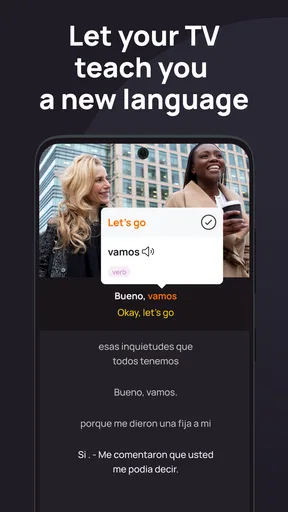
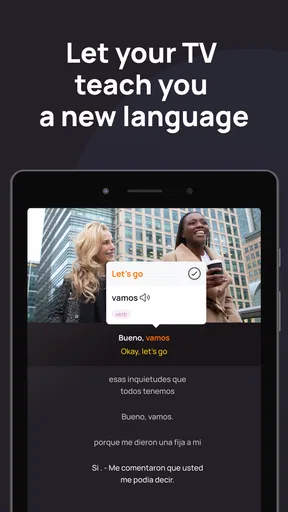
- Dual subtitles help connect spoken phrases with their written meaning.
- Playback controls make it easy to slow down or repeat difficult scenes.
- Personalized word lists support review of expressions encountered while watching.
- Offers a more entertaining alternative to traditional language-learning exercises.
Cons
- The catalog and available languages may vary by country or subscription plan.
- Some shows provide limited educational value beyond casual listening practice.
- Fast dialogue
- slang
- and accents can overwhelm beginners without basic knowledge.
- Offline viewing may be restricted or unavailable for certain titles or plans.
- A subscription is needed to access the platform’s full learning experience.
FAQs for Lingopie: Language Learning
What is Lingopie: Language Learning, and how does it work?
Lingopie is a language-learning app built around watching TV shows, movies, and other video content in the language you want to study. While watching, you can display subtitles in the original language and often translate individual words or phrases by tapping them. The app combines entertainment with vocabulary practice, making it feel more like streaming than following a traditional textbook lesson.
Which languages can I learn with Lingopie?
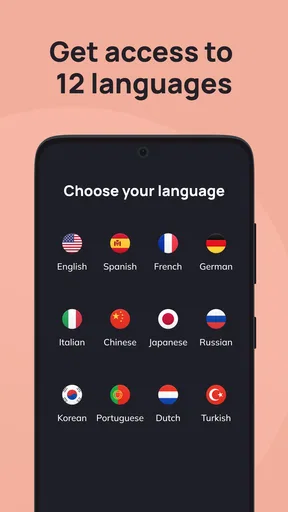
Lingopie offers several language-learning options, although the exact selection may change as its catalog develops. Commonly available choices have included Spanish, French, Italian, German, Portuguese, Korean, and other popular languages. Before subscribing, check the current app listing and in-app language menu, because available shows, subtitle support, and learning tools can differ from one language to another.
Is Lingopie free to use, or does it require a subscription?
Lingopie may allow users to explore selected content or start with a trial, but full access to its video library and learning features generally depends on a paid subscription. Subscription terms, trial length, pricing, and available plans can vary by country, platform, and promotion. Review the purchase screen carefully before confirming, especially the renewal date and cancellation conditions.
Is Lingopie suitable for complete beginners?
Lingopie can be useful for beginners because subtitles, translations, and the ability to pause or replay scenes make authentic content easier to understand. However, it is not necessarily a complete replacement for structured grammar instruction. New learners may benefit most by starting with slower, simpler programs, using dual subtitles at first, and gradually switching to subtitles only in the target language as their comprehension improves.
Can I use Lingopie offline or without an internet connection?
Lingopie is primarily designed for streaming, so a stable internet connection is normally needed to watch its content and use interactive subtitle features. Offline downloads may not be available for every title or subscription type, and app capabilities can change after updates. If you plan to study while traveling, check the current download options inside the app before relying on it without Wi-Fi or mobile data.


